
The view from z0
The same music sounds different depending on the DAW, the player, the machine. Have you ever caught your breath at a sound that seemed to come back to life — lush, full of energy, with a depth you could almost step into?
"Digital does not degrade." As a statement about data, that is true. But what reaches your speakers is not data. It is playback — a physical event that has passed through a DAC and an analog stage. CPU activity modulates supply voltage, and that modulation can surface as clock jitter at the DAC. Up to there, electronics knows the path. How it reaches the ear has not yet been put into numbers.
z0 began as a private tool, built by one mastering engineer for himself. Twenty-five years of A/B testing had taught him what helps and what clouds, so he put each coding habit through the same test and distilled the results into twenty rules — Z's Law. Do less. Display less. Get out of the way. Code that does not exist costs nothing.
We measured what could be measured. z0's output is bit-perfect: eighteen million samples, zero difference. Audio from a typical Mac application, meanwhile, passes through coreaudiod's shared-mode stream, where mixing, filtering and rate conversion leave the samples changed. z0 bypasses all of it.
We will not prove the rest, and we will not ask you to take it on faith. We simply offer z0, without compromise. The next A/B test is yours to hear.
The purity of the signal path.
Before z0 plays a note, it prepares the environment the note will be played in.
The entire track is loaded into RAM and pinned in memory before playback begins, so that the operating system has as little reason as possible to intervene while the music plays.
z0 delivers audio straight to the depths of macOS and takes the device with Hog Mode — the coreaudiod mixer is never in the path. Purity comes first. Quiet Mode, an option that tidies away background activity, cuts the Mac's system-wide CPU load — the part unrelated to the music — by up to 77% (measured on our own systems).
Display, intervention, how the program waits, how the signal is carried — each was reconsidered from zero, and anything that might touch the sound was removed.
All of it prepares the playback environment itself, for the music a client has entrusted to you.
What we could measure. What we could not.
What we could measure. With every tool off, z0Suite passes the source samples through bit for bit. We verify by machine that its export matches, SHA for SHA, a reference file that records the source as-is in Float64. We also measured our own doubt. z0Suite with every tool loaded, against an empty playback binary carrying nothing at all, compared through an analog DAC-to-ADC loop: across all 35 bands, the difference stayed at or below 0.004 dB. "A tool switched off disappears from the signal path" is not a theory. It is a measurement.
What we could not measure. None of this is enough to explain how z0 sounds on playback. As far as we know, no established metric exists. If none exists, build one: we are developing a measurement tool aimed at capturing this difference in numbers. When it is finished, we intend to give it away.
Until then, this page will not persuade you with figures. (It cannot.)
It's free. Listen first.
z0 includes a free, pure playback player: z0 Lucid. It is not a cut-down edition. It is the reference for every sound z0 makes, with nothing left to remove — free, because this difference can only be heard.
If you feel nothing, z0 is not a tool you need. Delete it. If you did feel something, the next wish will arrive on its own: I want to EQ without losing anything of this sound.
Who z0 is for.
z0 is not for everyone. If you prefer to work while watching a spectrum or a curve, there are excellent alternatives.
z0 suits people who want to make the final call with their ears. People whose daily routine includes mastering. People who want to shape sound from the keyboard alone, without touching a mouse. And people who have heard "same bits, different sound" for themselves, through z0.
The tools.
z0 consists of two pure playback players, one basic EQ, and an integrated mastering suite, z0Suite. All of them are launched from the Session Manager GUI, and every parameter is adjusted in a TUI running in Terminal.app.
z0 Lucid
The free, Float32-based pure playback player that is z0's reference — with nothing left to remove. No EQ, no meters, no animation: a path that lifts the whole track into RAM and sends it straight to the depths of macOS. Every sound in z0 starts here.
z0 Lucid+
Lucid extended to a Float64 base, and the foundation for every DSP tool that follows. Like z0Suite, it analyzes the peak positions of the whole track before playback: Peak Jump moves between peaks with the [ and ] keys, and Time Jump takes you to any time you type. Automatic LKFS measurement is built in; showing the measured value in the z0app track list is enabled with a z0Suite license.
z0 Sculpt
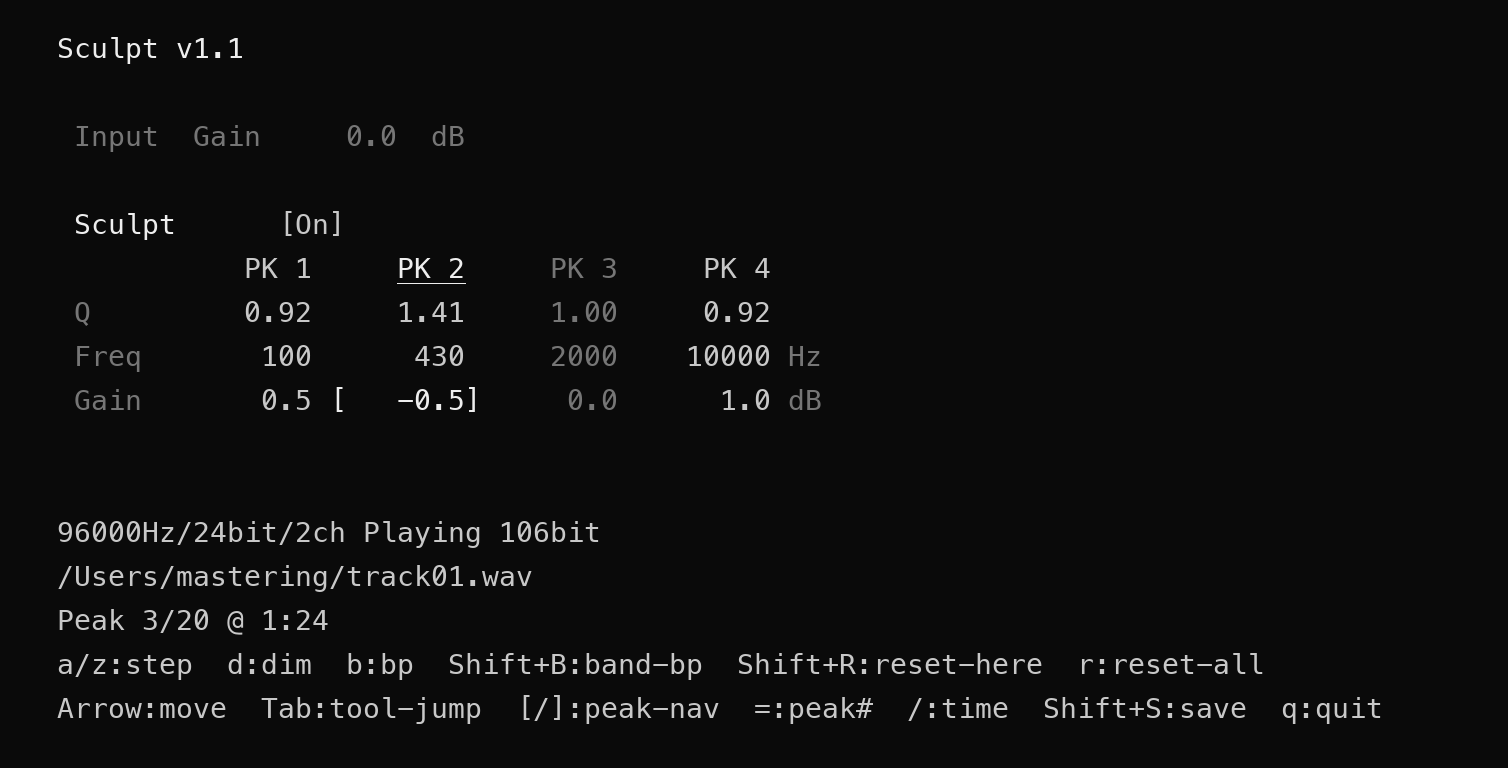
A simple tool: Lucid+ with a 4-band minimum-phase EQ on top. A basic EQ in the manner of a conventional hardware mastering equalizer.
z0Suite
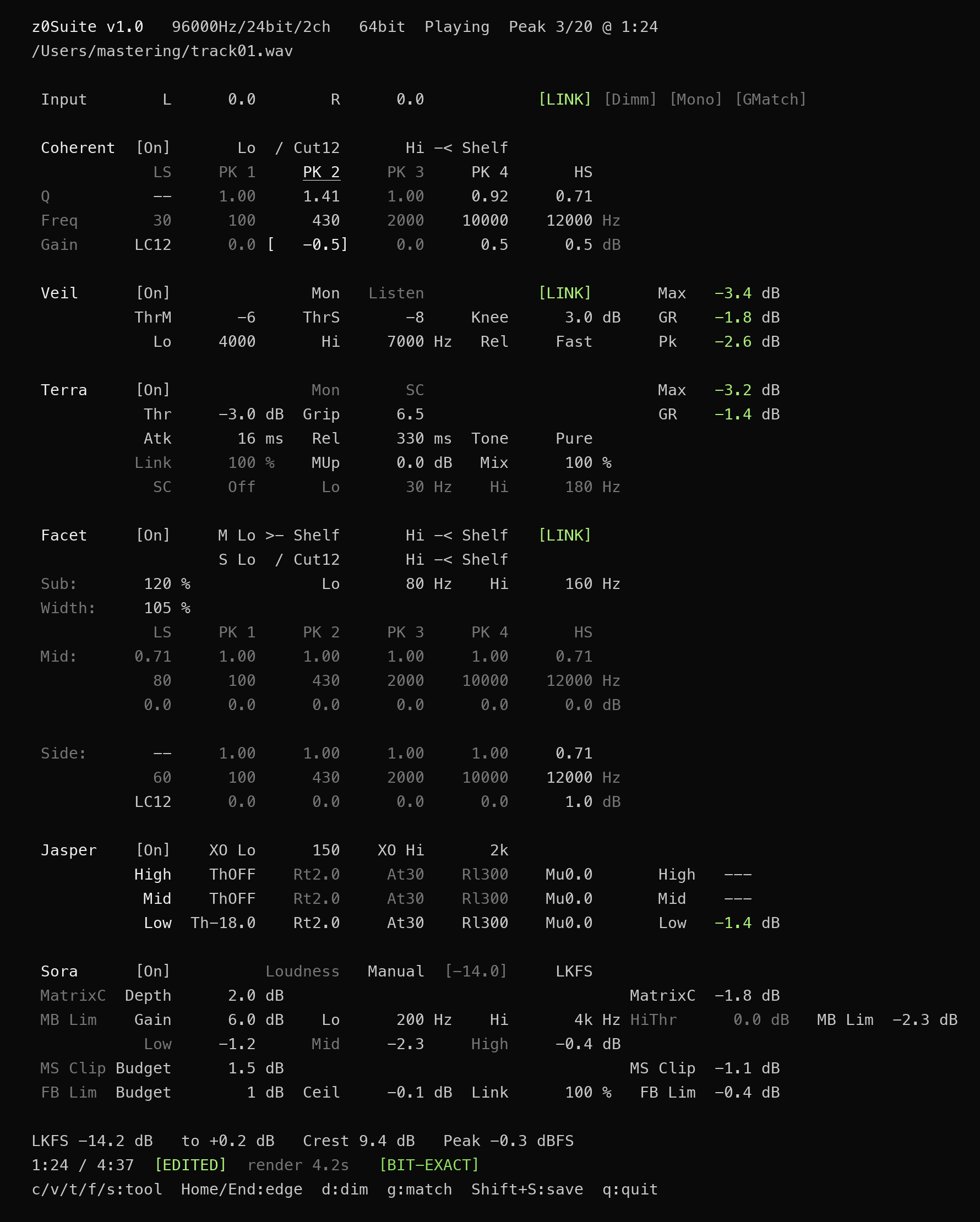
An integrated suite that gathers six tools — Coherent → Veil → Terra → Facet → Jasper → Sora — into a single signal path. Zero-phase EQ, de-esser, compressor, M/S stereo EQ (with zero-phase Width), sub-bass generation, multiband compressor and brickwall limiter form one continuous chain, operated together on one screen. z0Suite displays loudness (LKFS) after all processing, and the value is recorded in z0app as well.
Gain Match (g key) lets you compare before and after at the same level. Dimmer (d key) and Mono preview (m key) are built in, so most of the mastering process can be completed from the keyboard alone.
The EQs skip the DSP of any band at Gain 0 dB, and with every band at 0 dB the entire EQ engine is bypassed. A tool switched off disappears from the signal path. With every tool off, z0Suite returns to the same pure playback as Lucid+.
The six tools below are built into z0Suite, and are used only within it.
z0 Coherent

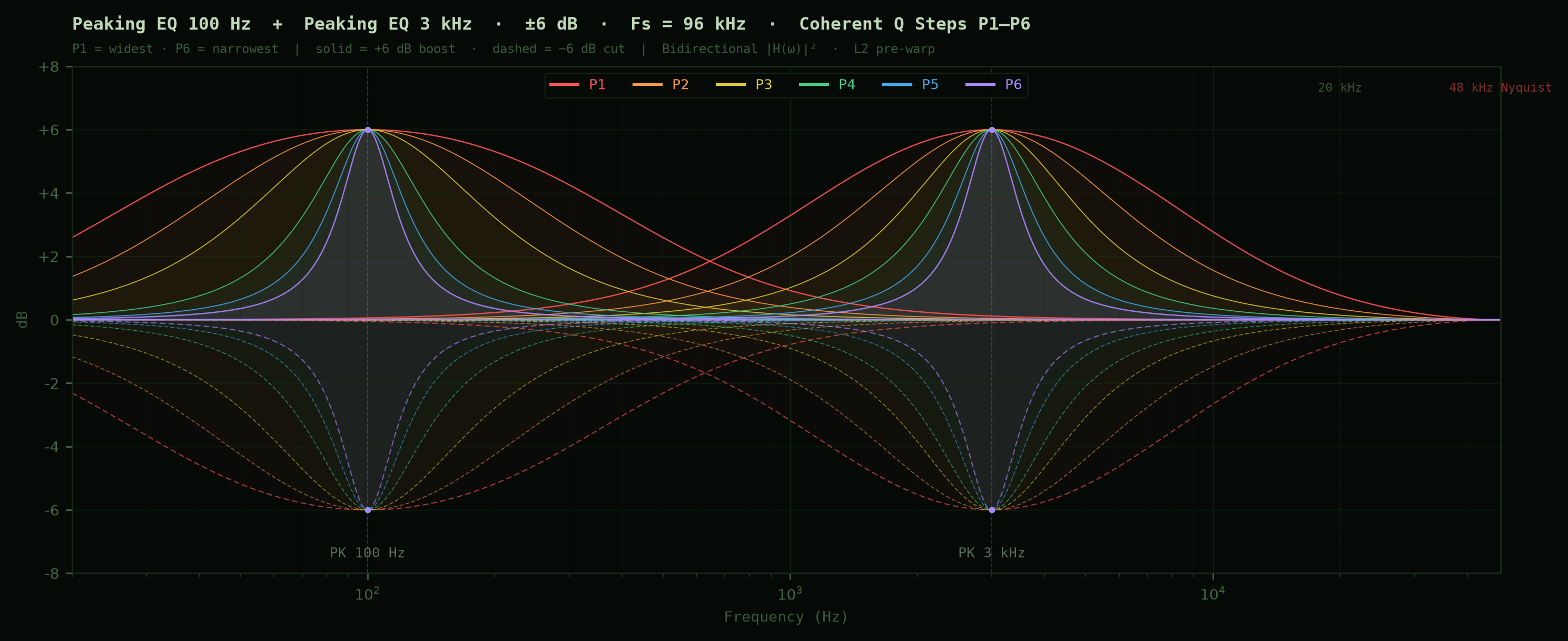
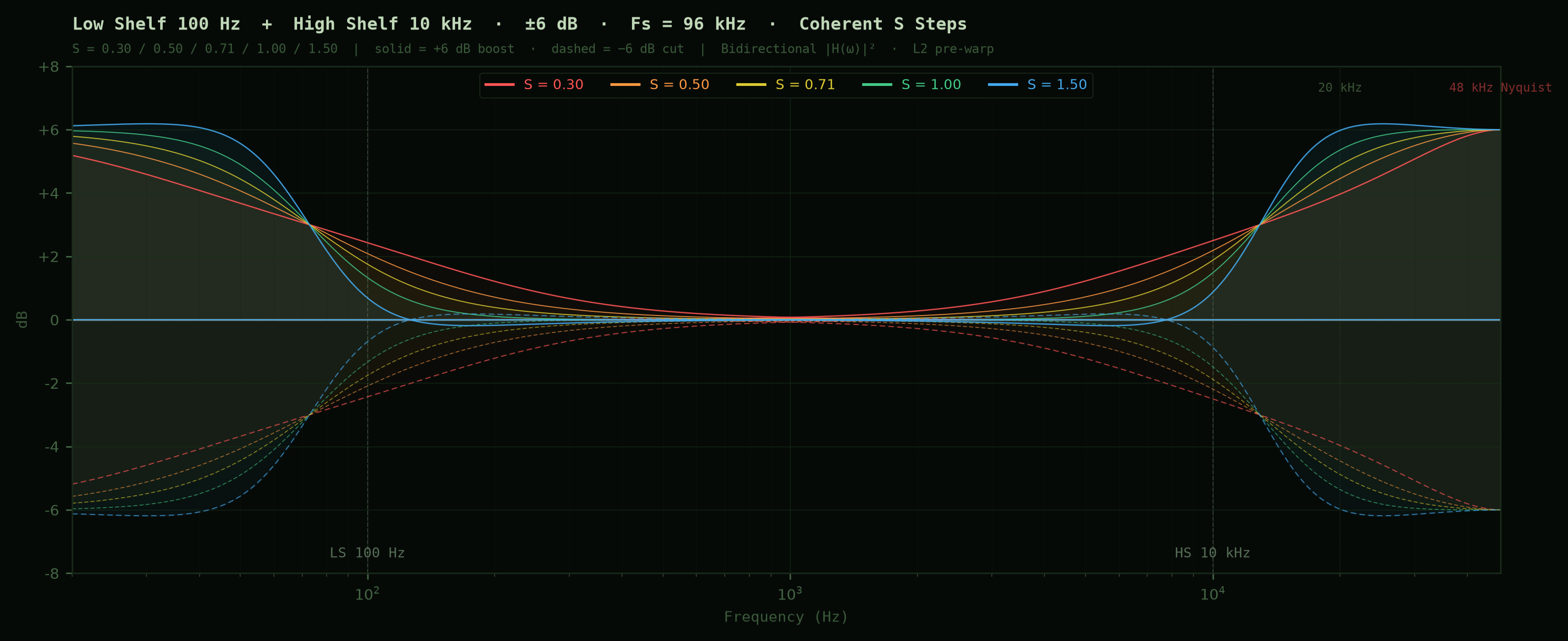
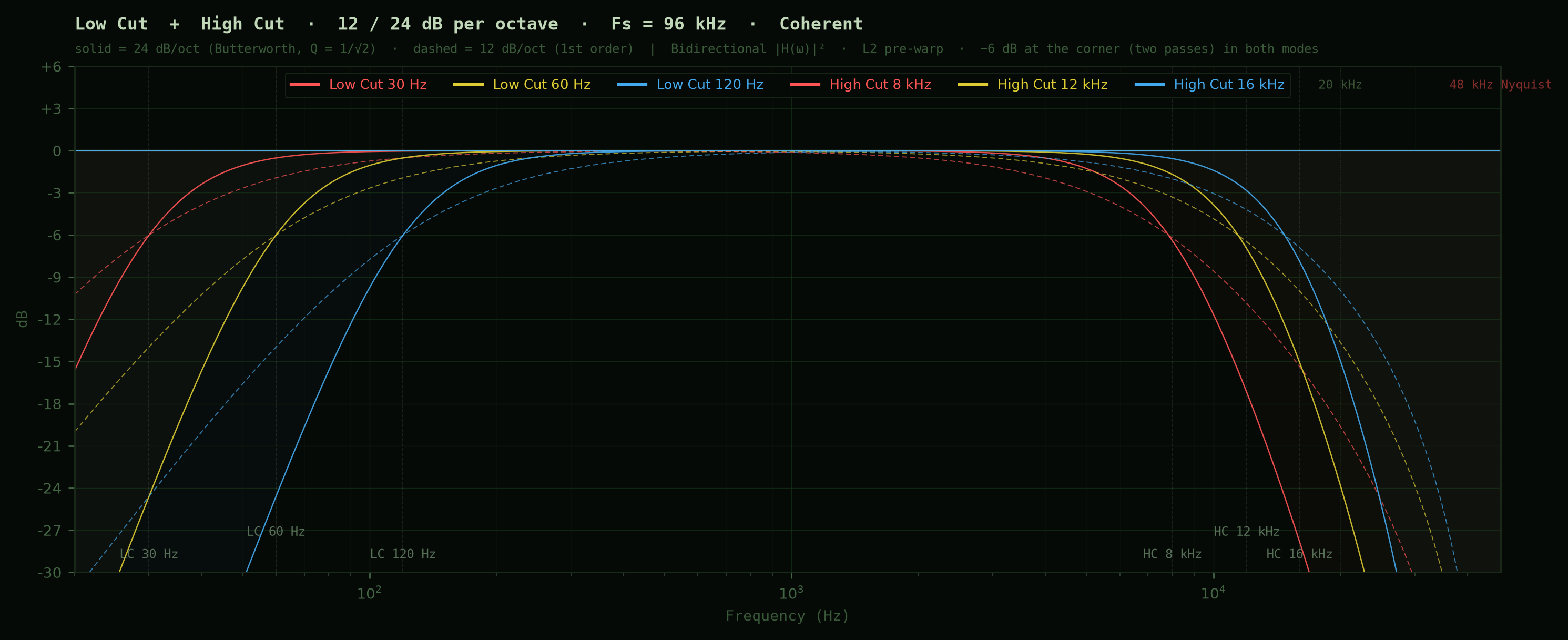
A 6-band zero-phase EQ. High-precision arithmetic keeps the phase and numerical errors that tend to appear in the low end, or in complex settings, under control: a transparent EQ. The shelves at either end can be switched to Low Cut / High Cut (12 dB/oct or 24 dB/oct).
z0 Veil

An M/S dynamic de-esser. Center and Side de-essing are controlled independently (or linked with Link). A transparent design that never lets you feel the process working. A Listen shortcut (m key) auditions the reduction component alone, and the gain reduction and peak reduction in the effective band are shown as numbers.
z0 Terra

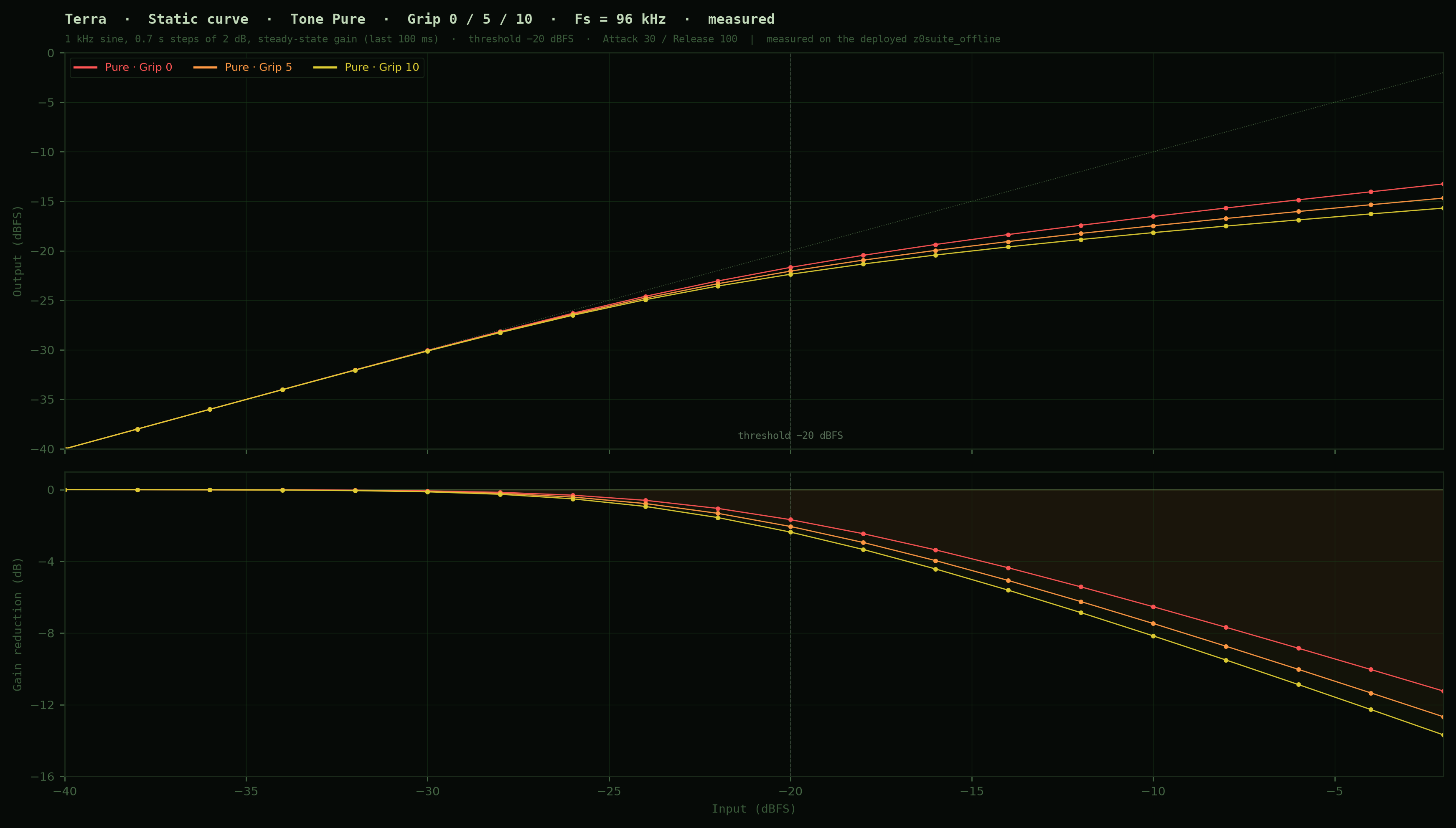
A VCA-style compressor. Tone selects among four characters — Transparent / Pure / Glue / Pump. Transparent levels the material and leaves no trace of a compressor. Pure adds density and moves the work slightly forward. Glue binds the whole. Pump actively creates groove and pumping. Tone changes the very quality of the compression.
Attack and Release are fixed steps in milliseconds (Attack 0.1 / 0.5 / 1.3 / 3.5 / 10 / 20 / 30 ms; Release 100 / 140 / 190 / 250 / 340 / 420 ms; defaults 30 ms / 100 ms). Ratio is set first by the Tone, and Grip decides how far into that range the compression goes (Soft Knee is likewise set by the Tone). A Mix control for parallel blending and a sidechain that narrows detection to a Lo–Hi band (default 30–180 Hz) are built in. The filter sits only in the detector, so the audio itself passes full-band.
z0 Facet
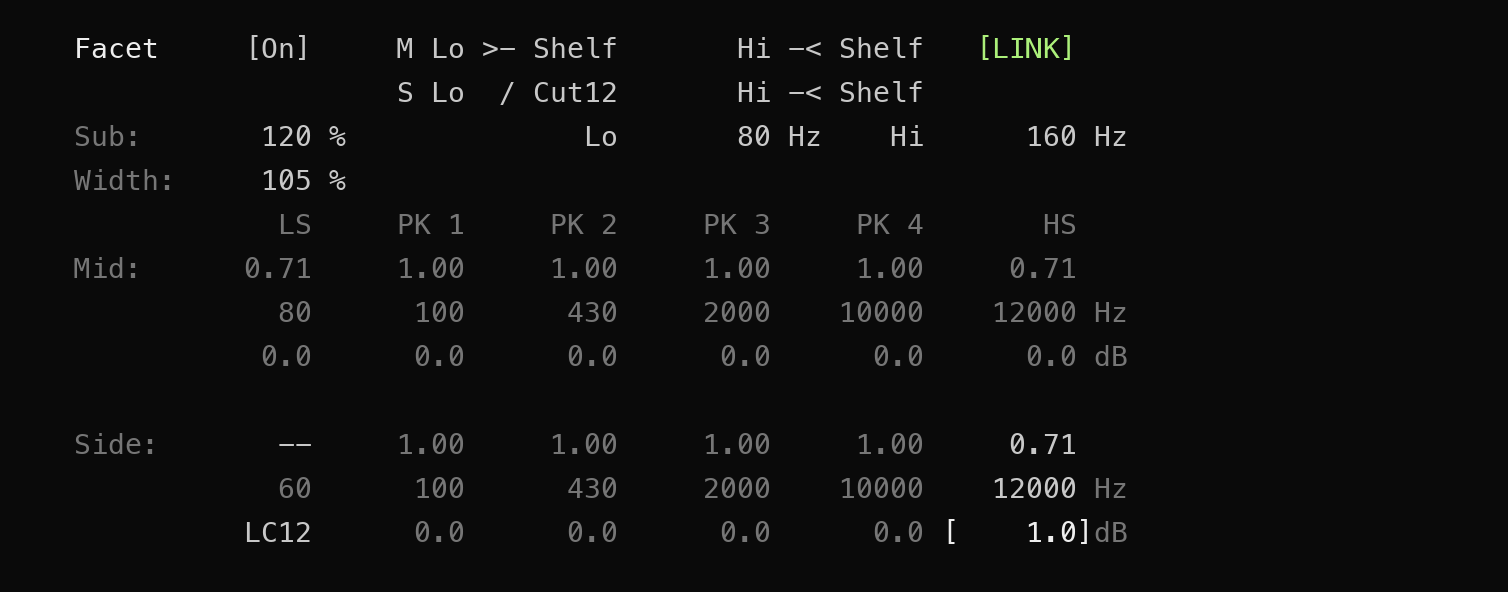
An M/S zero-phase EQ: a tool for equalizing Mid and Side independently. It carries Coherent's transparency into the M/S domain and adds a zero-phase Width parameter. Low Cut and High Cut are likewise independent for Mid and Side. With the M/S Link shortcut (L key), it can in effect be used as the same zero-phase EQ as Coherent.
Sub takes a chosen band of the center component and generates the octave below it, adding the result to the center. The source band is set with Lo and Hi, and Amount sets how much is added. Because this is generation rather than boost, it can add a lowest octave that was never in the source — to the center only, and without disturbing the phase.
z0 Jasper

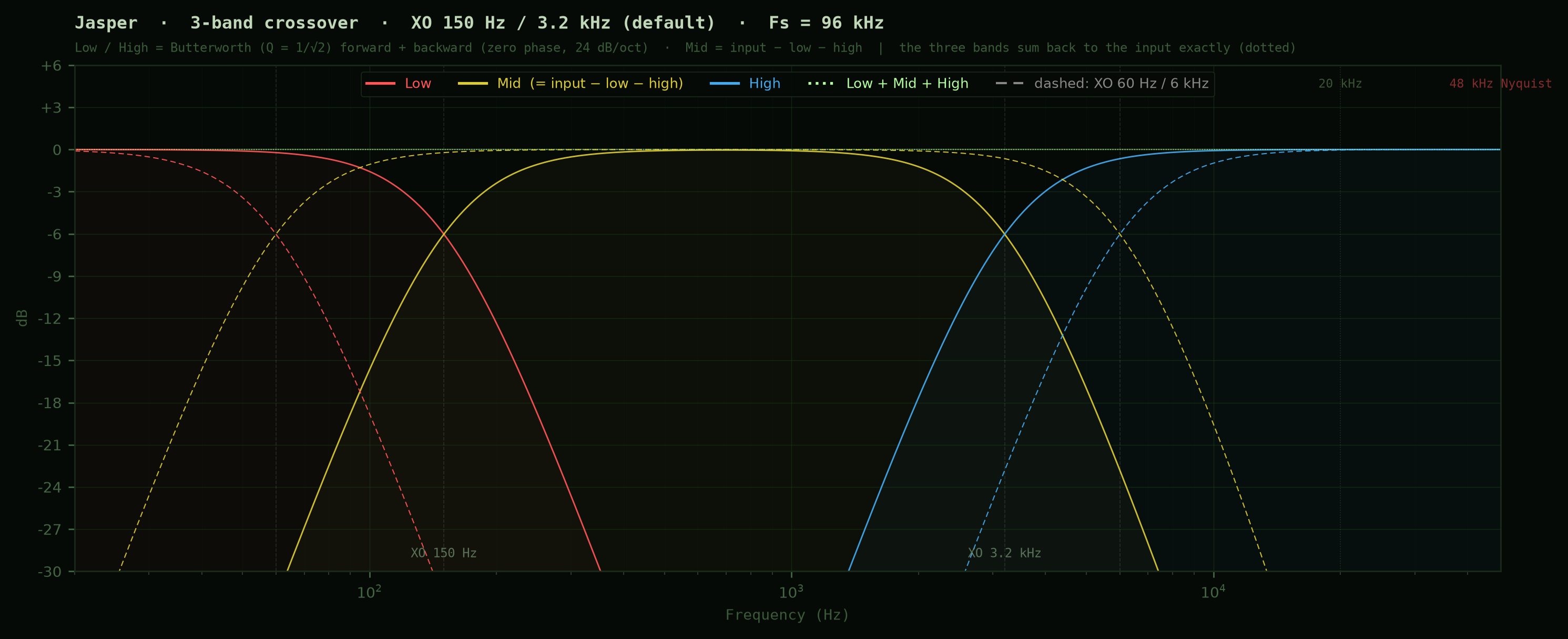
A 3-band multiband compressor with a vacuum-tube character. A zero-phase crossover splits the signal into low, mid and high bands, each compressed independently. Because the split uses zero-phase filters, dividing the bands does not disturb the phase.
Each band is controlled by Threshold, Ratio, Attack, Release and Makeup, and a ballistics engine inherited from Terra settles the level naturally. The crossover frequencies (Lo / Hi) are adjustable. A band whose threshold is OFF is not compressed, and with every band OFF and every Makeup at 0 dB, Jasper itself leaves the signal path.
z0 Sora

A next-generation limiter built from an M/S × 4-band matrix soft clipper, a 4-band brickwall limiter, an M/S soft clipper, a full-band brickwall and an ISP wall. It holds inter-sample peaks perfectly with the Ceiling left at 0. Auto Gain adjusts the input gain automatically toward a target loudness (LKFS).
You can distribute peak control across the stages and see how much work each one is doing, choosing the balance that suits the material.

Stereo Link adjusts how strongly the channels respond together, letting you balance a stable center with independent movement on either side.
On organic material, it stops peaks with a robust grip that keeps the original signal lush and leaves a piano undistorted. On aggressive material, it delivers enormous energy.
What z0 does not have.
z0 has no graphical EQ curve. No level meters. No animation. No spectrum analyzer.
This is not a shortage of features. Everything the audio does not strictly require stays outside the signal path. We removed, one by one, whatever the sound did not need. What remained was a TUI.
Operating through a minimal TUI restores a kind of concentration that has all but vanished from the modern studio: visual silence.
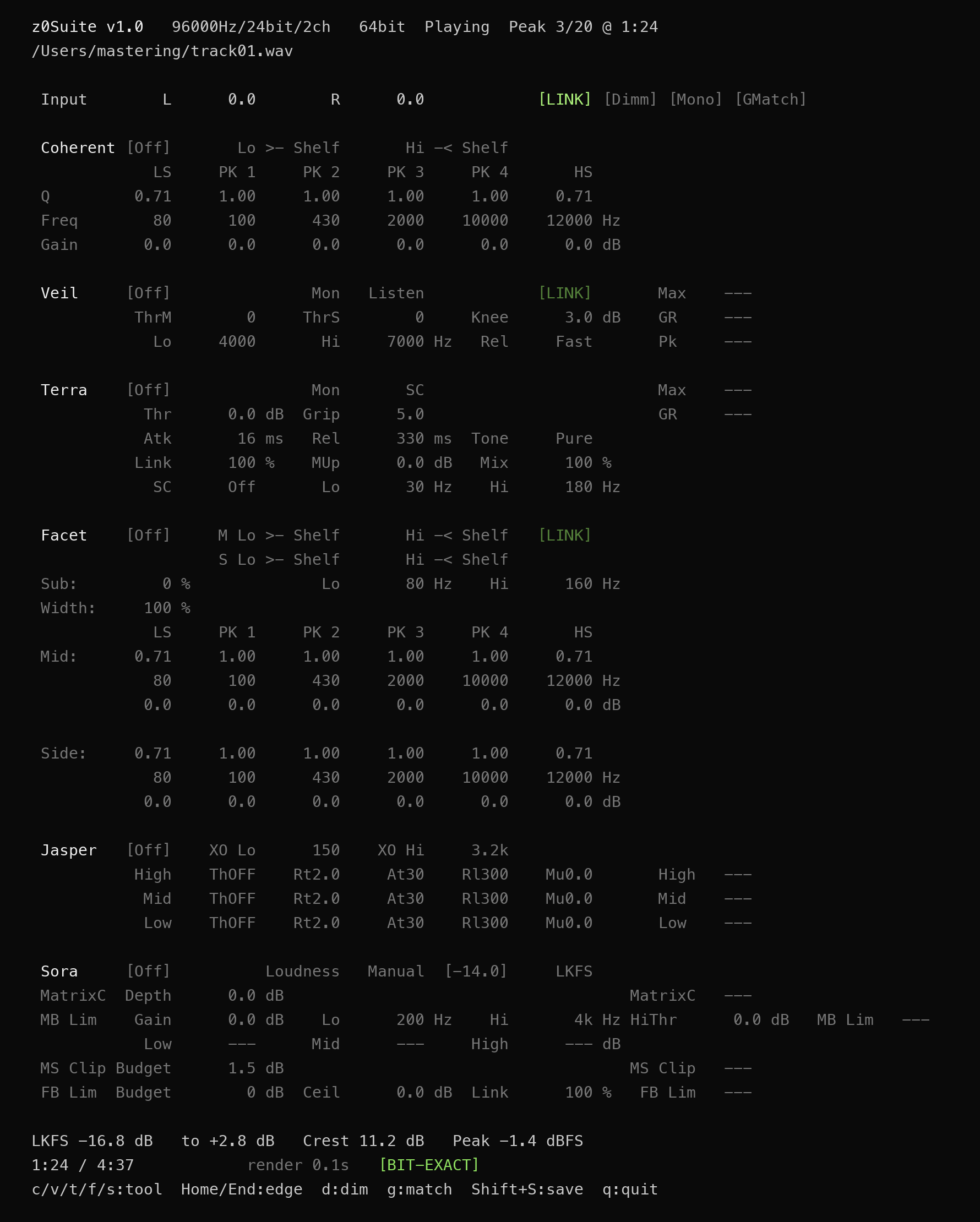
z0 is operated in two ways: by typing values directly, and by stepping with the A/Z keys. Gain steps in 0.5 dB; frequency and Q step through values chosen for mastering work. When you need it, surgical correction by typed value is available. The whole job is done with the step keys (or the numeric keypad) and the arrow keys. Once it becomes familiar, it is an extraordinarily efficient way to work.
Step values.
The step values selected with the A/Z keys are designed for the mastering room. Frequency has 21 steps based on the E12/E24 series, interleaved so that adjacent bands never overlap, covering the whole range from 10 Hz to 33 kHz. Gain has 23 steps, in 0.5 dB increments around 0 dB. Coherent's peak bandwidth has six positions, P1–P6, and S has five. Every value can be overwritten by typing a number.
The complete step tables are in the User Manual.

Session Manager.
Track management, tool switching, preset saving and history, batch export — all handled visually. EQ and the other tools are operated in Terminal.app. The GUI Session Manager confines itself to managing the music and takes no part whatsoever in the audio process while it plays. The terminal does not even know who typed the command.
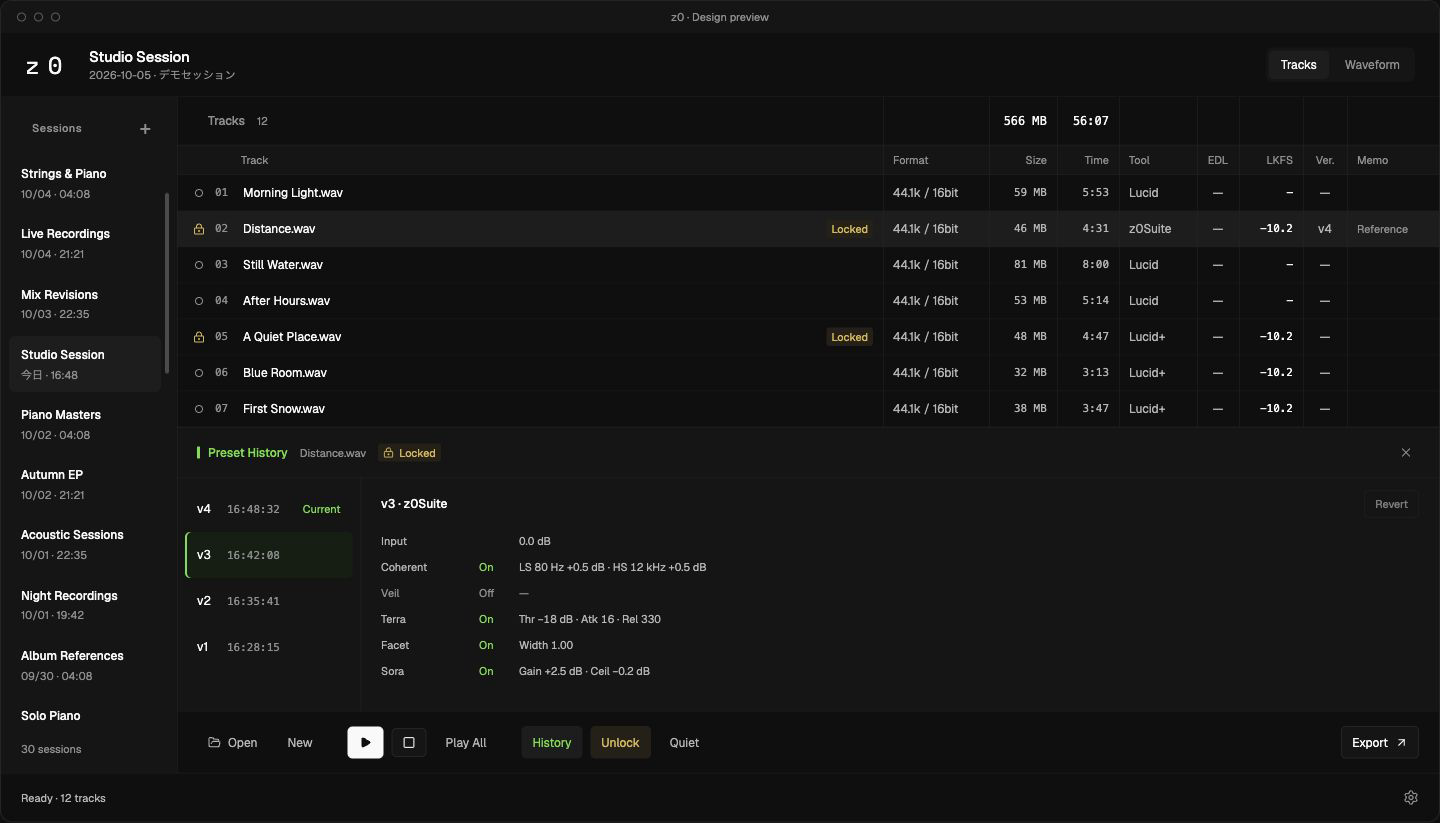
Drag and drop files to add them. Switch tools with the ← → keys. Press Enter to play. During playback a TUI opens in Terminal.app, where EQ parameters are adjusted in real time. Every TUI edit is saved automatically as a preset and reflected in the GUI at once.
Waveform editing
In most mastering work, waveform editing comes down to trimming and fading the head and tail of each track. Across dozens of tracks, that usually means zooming in and out, head and tail, over and over.
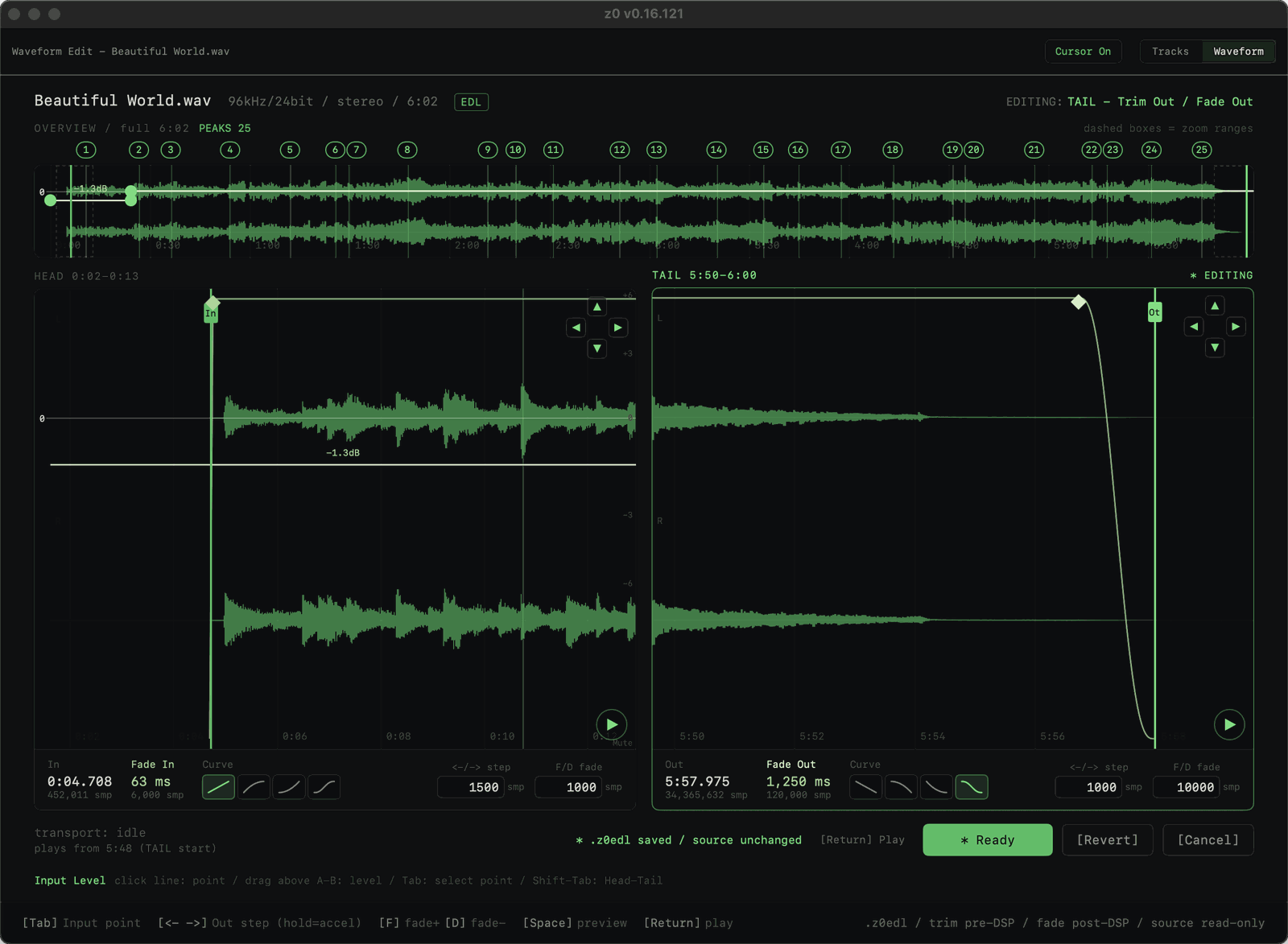
z0app gives you, from the start, a full-length overview plus zoomed windows for the head and the tail. Tab moves between them; ← → moves the Start or End point (Shift for 10×); the F and D keys set the fade time (Shift for 10×) — a clean workflow that never touches the mouse.
Start point, end point and the lengths of fade-in and fade-out are all non-destructive, and every setting is applied to both playback and export. The overview carries the same numbered peaks as Peak Jump; click one and the detail window moves there.
Input Level automation is written on the line over the waveform: click the line to place points, then drag between two points to move that whole span at once. Every span away from 0 dB shows its value, and what you write is applied to z0Suite playback and export.
Preset history
Every EQ edit accumulates as a time-stamped history. From the history panel (press H), you can revert to the preset at any point in time. Revert is non-destructive: choosing an earlier preset and reverting adds its contents as a new entry. Nothing in the existing history is ever lost.
Locking a track (L key) prevents accidental reverts and tool changes — protection for a track whose work is final.
Copy & paste, notes, export
Cmd+C / Cmd+V copies and pastes presets, with automatic conversion between 4-band and 6-band layouts. Each track can carry a working note.
Batch Export lets you select locked tracks and set the destination, filename suffix, bit depth, and sample rate in one window. Add _441 or _48 as a suffix to identify different rate versions by name. Float64 export writes the master and eq_sheet.txt; 16- or 24-bit delivery writes the requested WAV.

Session management
Multiple sessions are managed in the sidebar and saved automatically. A whole project can also be saved and reopened as a .z0proj file. Use it as a mastering engineer's total-recall tool — or as a music lover's collection of playlists.
ZCON — the pure sample-rate converter
z0Suite's native export is 64-bit float. It records the result of the chain's arithmetic without a single rounding.
Deliverables, though, come in many formats, and somewhere the sample rate must change and bits must go. For that step z0 carries ZCON, its own pure sample-rate converter: delivery files straight from the 64-bit float master, with no external converter in between.
The conversion filter comes in two types of differing character.
| Type | Design priority | Alias rejection | Impulse response length | THD+N |
|---|---|---|---|---|
| Steep FIR | Rejection | −206.6 dBFS | 6.56 ms | −239.1 dB |
| Short FIR | Response length | −45.4 dBFS | 3.46 ms | −238.5 dB |
Measured at 96 → 44.1 kHz. Steep FIR pushes aliasing down to near the measurement floor. Short FIR holds the ringing that extends before and after the filter to half of Steep FIR's duration (SARACON type), and is the default.
The filter coefficients are frozen bit for bit, and the dither's random seed is fixed. The same master yields the same delivery file, whenever it is run. A replacement matches its predecessor exactly.
For 16- or 24-bit delivery, the Float64 intermediate master and conversion verification JSON are used internally; only the requested WAV is placed in the destination. Choose Float64 to write the master and eq_sheet.txt to the destination.
ZCON lives outside the signal path. It plays no part in playback or in the z0Suite chain.
Start with the free Lucid — z0's reference sound.
Lucid Free is free, with no time limit. Reference and z0Suite are one-time perpetual licenses; there are no monthly or annual plans. Prices below are in USD for customers outside Japan and are arranged by e-mail. Customers in Japan: see z0mastering.jp for pricing in JPY.
Reference and z0Suite are one-time perpetual licenses: the major version you purchase is yours to use without expiry, and any update released within 12 months of purchase is free. One license runs on up to two Macs at the same time. A 30-day free trial is available on request.
Tool matrix.
| Tool | Type | Bands | Phase | Precision | Rendering | Peak Jump |
|---|---|---|---|---|---|---|
| Lucid | Playback | — | — | Float32 | — | — |
| Lucid+ | Playback | — | — | Float64 | — | Yes |
| Sculpt | EQ | 4 PK | Minimum | DD ~106-bit | Real time | Yes |
| Tool | Type | Bands / Parameters | Phase | Precision | Cut switching | GR display |
|---|---|---|---|---|---|---|
| Coherent | Zero-phase EQ | LS+4PK+HS | Zero | DD ~106-bit + Kahan | Low Cut / High Cut 12 · 24 dB/oct | — |
| Veil | M/S de-esser | ThrM / ThrS / Lo / Hi / Knee | Zero / minimum | Kahan ~80-bit | — | GR / Pk GR |
| Terra | Bus compressor | Thr / Grip / Atk / Rel / Tone / Link / MUp / Mix | — | Kahan ~80-bit | — | GR / Max |
| Facet | M/S zero-phase EQ | M:6 S:6 + Width 0–200% | Zero | DD ~106-bit + Kahan | 12 · 24 dB/oct, M/S independent | — |
| Jasper | Multiband compressor | 3 bands: XO Lo / Hi + per-band Thr · Ratio · Atk · Rel · MUp | Zero-phase XO | Kahan ~80-bit | — | Low / Mid / High |
| Sora | 4-band ISP limiter | Depth / Gain / Lo / Hi / HiThr / MS Budget / FB Budget / Ceil / Link | Zero | Kahan ~80-bit | — | MatrixC / MB Lim / MS Clip / FB Lim / Low / Mid / High |
z0Suite as a whole is a Float64 pipeline. Export records that Float64 result without rounding; playback is a listening view of the same result reduced to Float32. The [BIT-EXACT] indicator on screen shows that what you are hearing and what will be exported come from one and the same process. L2 pre-warping correction on every band, and Peak Jump, are common to all tools.
Memory and formats.
z0 loads the entire audio file into RAM before playing or processing it. This keeps storage out of the way during playback, but the approach has two drawbacks. First, on albums where tracks run together with no gap — a live recording, say — there is a moment of silence between tracks while one buffer is released and the next is filled. Second, the maximum playable file length depends on the free memory in your system.
Free memory does not affect continuous playback of a playlist. Memory is released completely after each track.
The table below scales a measured reference point — 16 GB installed, 11 GB assumed free — proportionally to each RAM size, as a guide.
| Sample rate | 8 GB | 16 GB | 32 GB | 64 GB | 96 GB | 128 GB |
|---|---|---|---|---|---|---|
| 44.1 kHz | 32 min | 1h 4m | 2h 9m | 4h 19m | 6h 29m | 8h 39m |
| 48 kHz | 29 min | 59 min | 1h 59m | 3h 58m | 5h 58m | 7h 57m |
| 88.2 kHz | 16 min | 32 min | 1h 4m | 2h 9m | 3h 14m | 4h 19m |
| 96 kHz | 14 min | 29 min | 59 min | 1h 59m | 2h 59m | 3h 58m |
| 176.4 kHz | 8 min | 16 min | 32 min | 1h 4m | 1h 37m | 2h 9m |
| 192 kHz | 7 min | 14 min | 29 min | 59 min | 1h 29m | 1h 59m |
Measured with a 16-channel output device (Lynx Aurora N). z0 allocates its playback buffer to match the device's output channel count, so devices with fewer outputs allow longer playback (a 2-channel device gives roughly 8×). Other running applications may reduce the time actually available.
Offline export uses less memory than playback and can handle longer tracks. Float64 output and the Float64 intermediate master for 16- / 24-bit delivery still meet the RIFF format’s 4 GB limit first (per-file limit: about 101 min at 44.1 kHz, 93 min at 48 kHz, 50 min at 88.2 kHz, 46 min at 96 kHz, 25 min at 176.4 kHz, 23 min at 192 kHz; tracks that exceed it stop before export).
Frequently asked questions.
Can I use it if I'm not comfortable in the terminal?
Yes. Day-to-day operation is only the arrow keys, the A/Z keys and typed numbers. Track management, presets and export are handled by the GUI Session Manager; the terminal is devoted solely to adjustments during playback.
Why are there no EQ curves or meters?
So that everything the audio does not strictly require stays outside the signal path. See "What z0 does not have" above.
Can I use it alongside my DAW?
Yes. Mix in your DAW and finish in z0. We recommend hard-bypassing every plug-in on the DAW's master fader and bouncing at the session's own precision — 32-bit as 32-bit, 64-bit as 64-bit. In z0's Export window, choose Float64 WAV or 16- / 24-bit PCM WAV.
Is there a wait for rendering?
z0Suite prioritizes updating the sound at the current playback position while whole-track confirmation continues in the background. You can listen and adjust without waiting for that confirmation, including the first time a tool is switched On and when changing Facet Sub. An edited value is dimmed gray until the sound reflects it, then returns to its normal color without moving the cursor. [BIT-EXACT] indicates whole-track confirmation. Update and confirmation times depend on the track length, settings and machine.
How do I make a 44.1 kHz / 16-bit delivery file?
In z0app's Export window, choose 16- or 24-bit output and 44.1 kHz. A suffix such as _441 identifies the rate version in the filename. ZCON converts the Float64 intermediate master and places only the delivery WAV in the destination. See the "ZCON" section for details.
Is there a free trial?
Yes. A 30-day free trial of Reference or z0Suite is issued on request through the contact form. Since there are no monthly or annual plans, nothing is charged automatically when the trial ends. Lucid Free is free with no time limit.
Does license activation need an internet connection?
No. For Reference and z0Suite, open the "License" tab in z0app, use [Export activation request...] to write a request file for that Mac, and send it to us through the contact form. Load the signed .z0license you receive back with [Import license...]. Activation is entirely offline.
What are the system requirements?
An Apple Silicon Mac running macOS 13 Ventura or later. Supported formats are listed in the specifications table above.
The proof is not yet a number.
The experience takes five minutes. Any DAW, any high-end player will do. Compare the sound.
"Perfection is finally attained not when there is no longer anything to add, but when there is no longer anything to take away."
— Antoine de Saint-Exupéry